


How do you summarise a lecture? Or an article? Or any other text that's not too long? Mindmapping is a fabulous analysis tool, so it's a very effective way of summarising the main ideas in a text. XMind, with its features - notes, export, etc. - will enable you to go even further, even faster. In short, to be more efficient!
Many people find it difficult to summarise: students in exam period, journalists who have to present a new law in 1,500 characters, managers who have just been asked by their boss to produce a report in "no more than two pages" on the situation at the Trifouillis-les-Oies branch...
Where to start? How do you distinguish between the author's main ideas? And above all, where do you stop?
These are all issues that cause anxiety and even panic in some people... and not the stupidest, contrary to what you might think. Perfectionism can lead to paralysis when faced with the limits of the task in hand.
First, a bit of theory.
What is a summary?
It's a shortened version of an existing text. We're not asking you to rework the text, to embroider or reinvent what the author has said. You are being asked to re-expressin fewer words, the main ideas of his speech.
Take a look at this mind map: it illustrates the method I suggest to the students I help in academic coaching and to the participants of our Triple A Workshops: Learning To Learn. (Click on the map to view and download it from the "French Mindmaps" group on Biggerplate).

First stage: preparation
Don't dive straight into your pen, pencil or keyboard. Start with a quick first reading of the text.
Try to identify the main parts of the text. If the author has structured his text well, each part should contain one or two essential ideas, no more. The title gives you the central idea of the text. The heading - the short text that summarises the article and is placed under the title - is already a summary of the main ideas of the article. And the headings of an article or the sections of a course give you an overview of the ideas developed in that section.
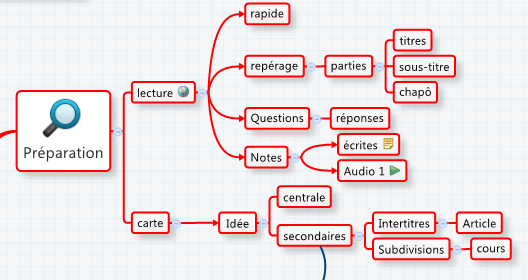
During this first reading, make a few notes. You can take these first notes in the form of a rudimentary mindmap: central idea (the title), secondary ideas (headings, captions, sections). XMind also lets you take written notes (longer than just keywords, already 'written') which will be included in a document exported in text format if you wish. I'll come back to this later. And audio notes too: you record your voice and the note appears (as a green arrow) in the subject and branch you have chosen.
You can already ask yourself questions about the content of the text and answer them. If you are summarising for an exam, this is an effective way not only of understanding and memorising, but also of preparing yourself for the different questions you might be asked.
Second stage: the more in-depth mindmap
Reread your first mindmap: this will give you the central idea, the secondary ideas and a few notes and questions and answers. Go further: reread your text a second time, including details. New keywords on new branches.
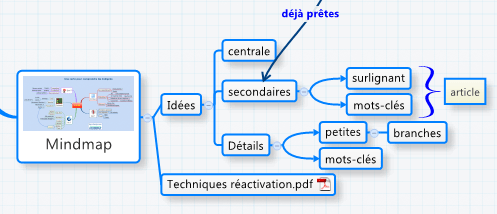
You can identify important words by highlighting them in the article. XMind also lets you integrate documents into your topics (here, a PDF mindmap on memory reactivation techniques).
At this stage, you have a mindmap that includes all the ideas in the text, in some detail. If you have time, perhaps leave it for 15 minutes to an hour before moving on to the next stage. You'll approach it with a more rested mind and fresh eyes.
Third stage: proofreading
Reread your text again and your mindmap at the same time. Take care with your mindmap. You may find that certain elements are not yet there. Or not in the right place on your map. XMind lets you move all the elements from one branch to another, and so on.
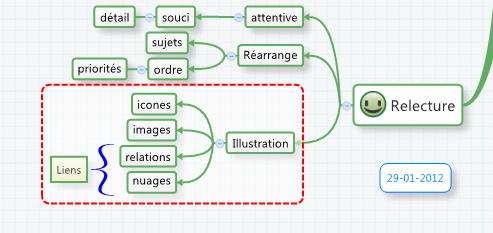
Take the opportunity to illustrate your mindmap: don't forget that the combination of keywords, images and position on the branch is essential for understanding and memorising.
Another essential element for understanding and remembering: links. Create links and associations between the different parts of your mindmap. Illustrate them with arrows, braces or clouds.
Fourth stage: exporting your mindmap
XMind lets you export your mindmap in a variety of formats. Use it to save time!
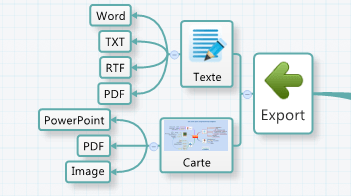
How can you do this? By exporting your mindmap as text: XMind gives you access to Word, TXT, RTF and PDF. Please note that if you export your document as a PDF, you will need a PDF editor to be able to edit it...
If you export it to Word, for example, the central idea will become the title of your document, the secondary ideas will become chapters or headings, and so on. You can choose to keep your images or not. And, very interestingly, you can also integrate your written notes into your final document. One of these days I'll come back to XMind's impressive export capabilities!
You can also export your minmap as a mind map by choosing the image - as in this post - or the PDF document. Or you can choose PowerPoint mode, which gives you a presentation in just a few clicks that might just wow your boss!
Fifth stage: reactivation
If you're summarising a text in order to memorise it, don't forget the reactivation techniques. They are powerful memory tools. It would be stupid not to use them!
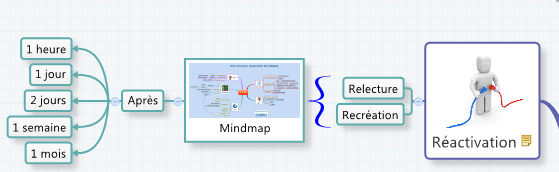
Mind maps allow you to reactivate your memory in a very simple way: reread them aloud, preferably following the branches with your finger, to stimulate all your sensory channels at the same time.
Or better still: recreate them! Redraw your cards by hand or with software. By copying them. Or from memory. Then compare them. Rework them. Ask new questions that require new answers.
Here's an example of how I summarised a text in this way, using the following questions participants in the Apprendre A Apprendre workshop.
Did you like this article? Subscribe to my newsletter and never miss another article or event!


 English (UK)
  Français
  Italiano
  Español
  Português
So what do you think? Tell us all about it!