

All the specialists will tell you: the main problem when creating a website is the structure.
It's difficult to visualise the position of each page and the links between them. Mindmapping can help. And XMind, with its different formats, can take you one step further. Here's a demonstration.
Web designers' nightmare is the client who has a vague idea of what they want. Or who change their mind about the structure of their site more often than they change their shirt.
It's quite normal, though. Not all of us are web writing specialists, so we sometimes find it hard to visualise the final structure of our site. A mindmap, with its highly hierarchical structure, can help. And if we use XMind, Not only can we make changes as we work, we can also present the results in different formats with a single click.
A mindmap to get you started
Let's take a simple example: the site of a shop selling Provençal products. We already know that we'll have a reception, a page contact, one page links and we are legally obliged to publish « legal notices »on our site. We can therefore start the structure of our site in this way. We'll add to our map as we go along.

The " Provençale »is a shop. We therefore assume that it sells products. We add a Products to our structure. We will then fill it in. We can also present the company on another page.
Complete the pages of your website
We are starting to complete the pages of our website:

On page Company, we can add a Shop, which presents the physical shop, the point of sale.
On our page reception, we can add :
- a welcome message
- a link to the shop
- a link to the products
Add a « Blog »to your website
- product news,
- the brands' points of view,
- advice for our customers,
- etc.

Don't forget the legal notices on your website!
Don't forget the legal notices: not mentioning them can have serious legal consequences. Many e-commerce sites seem to be unaware of this obligation, but the slightest complaint from a customer can turn this omission into a legal disaster... You might as well know.
Legal notices are part of a company's identity.
It might be better to place this page under the Company in our structure:

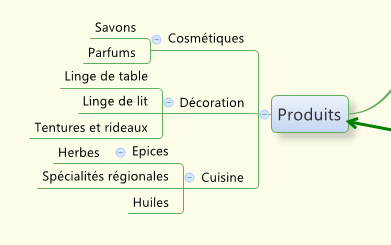
Add a « Products page«to your website
The page Products can link to product type pages.
We won't be looking at online payment and purchasing here. The aim is not to have the most complex map possible, but to show how we can work on the structure of a site 😉
You can learn more about these concepts at our mindmapping training for start-ups and entrepreneurs!
Add a links page to your site
We are adding the links to sites A, B and C to our page Links.
The « Links »It's not always compulsory on a site, but it shows that your site is open to others, which is always a good thing.
The structure of our site is now complete.

Turn your mindmap into an organisation chart
But the site designer we work with may not be used to working with mind maps. So with one click, in the Properties XMind, choose the structure Org Down or Org Bas, depending on the language of your software.
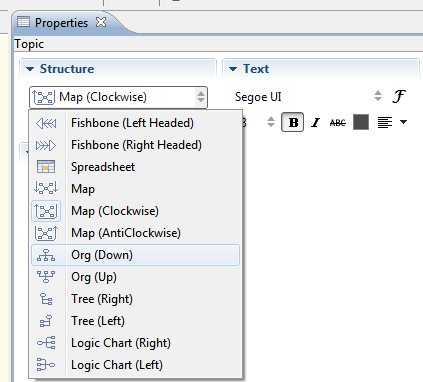
Then, for each page, I activate the Straight shaft. To place secondary pages below the main pages. This avoids having an excessively large flowchart. And we have a magnificent organisation chart of our website.

Turn your mindmap into a table
You can also turn your mindmap into a table, if this is easier for your staff to interpret.
Here too, use the Properties from XMind and choosing Table or Matrix, depending on the language of your programme.

Good news all this can be achieved with the free version of XMind which you can download here. Want to learn more about mindmapping? Visit our diary to keep up to date with conferences, seminars and training courses!
Did you like this article? Subscribe to my newsletter and never miss another article or event!


 English (UK)
  Français
  Italiano
  Español
  Português
Qu’en pensez-vous ? Dites-nous tout !