


How do you create a quality teaching scenario? One that precisely meets the needs of your future learners? And breaks the video-quiz downward spiral once and for all? Try the ABC Learning Design method. A method based on the learner's needs and the skills to be acquired.
Updated: 17 August 2026 – New infographic available for download.
What is a quality teaching scenario?
What I'm going to say here may seem very subjective (I assume so). For me, a quality teaching scenario is :
- A plan that takes into account all the needs of future learnersincluding non-cognitive needs:
- (socio-affective problems
- technical problems,
- administrative difficulties,
- limiting beliefs,
- lack of communication,
- etc.

- A scenario that does more than simply present the material (acquisition activities) but offers future learners opportunities :
- interact with the new concepts,
- communicate and collaborate with other learners,
- use the new skills and knowledge in a different context (creation, recreation, mixing)
- to think on what they have learned
- take a step back from their learning strategies (metacognition)
ABC Learning Design: the Made in UCL teaching scenario
Where does this ABC Learning Design teaching scenario come from, and what's so special about it?
This educational scripting method was developed at theUniversity College of London (UCL). It is based on Diana Laurillard’s ‘Conversational Framework’ model; I had the pleasure of attending a training course on blended learning run by the University of Leeds, led by her.
It is this scripting method that I am now proposing to participants in my training course. Create your online course. Because it fits in particularly well with my concern to meet learners' needs. And it fits in very seamlessly in Design Thinkingwhich is the general training design method I use.
Originally, the ABC Learning Design method consisted of a board game on which teachers placed cards corresponding to the different learning activities. Today, there are various digital tools that can be used to create this type of scenario, including remote collaboration. We talk about it in an article on this blog.
Activities that engage your learners
I often see articles, which sound an awful lot like advertisements, extolling the virtues of this or that 'engaging' tool for your learners. But in reality, are the uses of the tools that will motivate your learners or not.
The acquisition
However, in many courses, particularly distance and hybrid courses, the only activities on offer are really at a low level: that of acquisition. For example :
- documents to read or download
- videos to watch
- podcasts or audio files to listen to
- testimonials from experts
- computer graphics or charts

Far be it from me to denigrate these acquisition activities but they represent only a small part of learning activities that you can implement in a quality training courseThe ABC Learning Design class these activities into 6 categoriesincluding acquisition.
Next in line are :
Practice - exercise or training
These are all the activities that will allow your learners to practise, acquire practical skills :
- MCQs - formative with immediate feedback: can be adapted to many subjects, especially for memorising or understanding
- Stack / CodeRunner: for writing code and immediately checking that it has been corrected
- Online role-playing (forum, virtual classroom)
- Reflective tasks - individual or group (forum)
- Case studies (forum, course)
- Burst of exam questions (forum)
- Quizzes: fill-in-the-blanks, matching, sorting into categories, etc.
- Field and laboratory activities
- Simulations (Virtual and augmented reality, flight simulators, machine tool simulators, etc.).
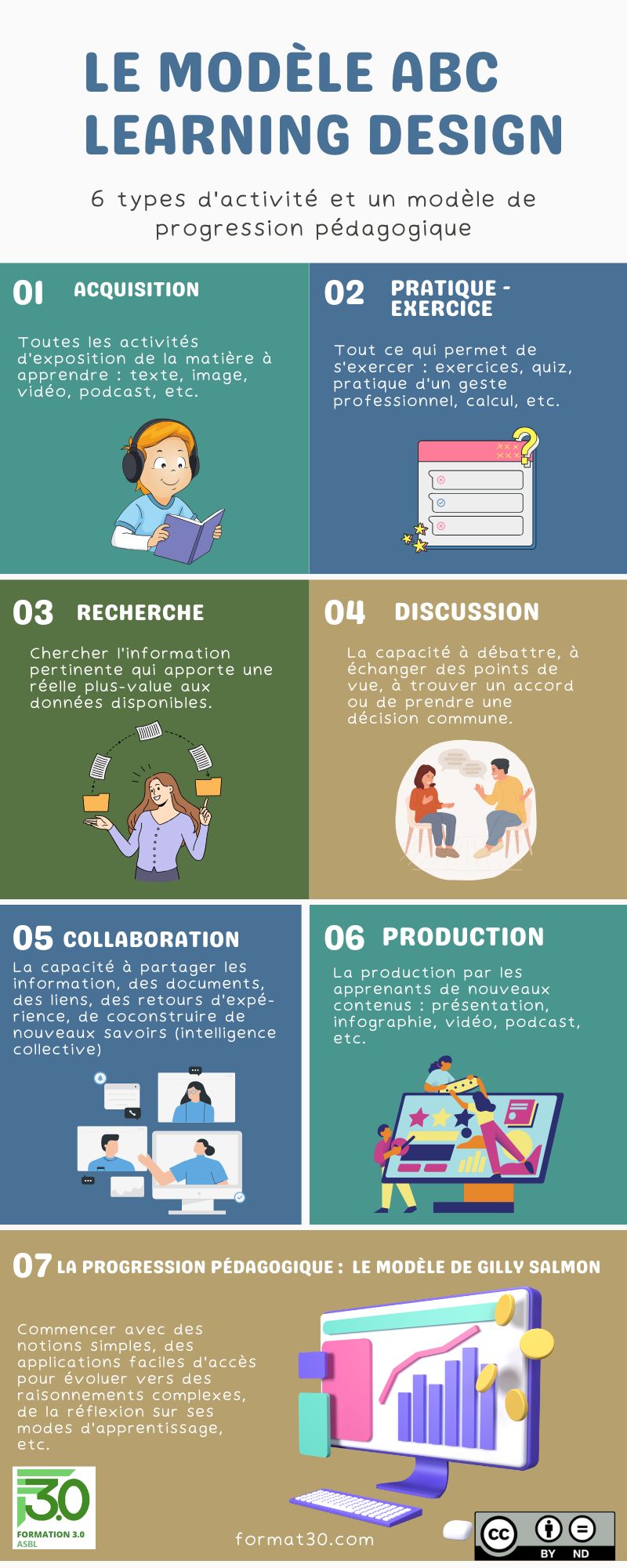
You can download the infographic by clicking on the ‘Download’ button below.
Investigation - research
Here, we're talking aboutto carry out researchs, but also select relevant information in view of the price target.
- Web searches using generic search engines (Google, Duckduckgo, Lillo, etc.) or specialist search engines (CC Search, Podchaser, etc.)
- Comparing texts
- Digital data collection (monitoring, scraping, etc.)
- Evaluation of ideas, proposals for action, etc.
- Action research
- Writing review articles
Discussion
Discussion, of course, concerns all the exchanges between learners, as well as decision-making (on the relevant information to keep, on the form to give to a production or collaboration, etc.).
- Interview with an expert (forum/chat)
- Webinars (virtual classes)
- Answer / example of a previous job (forum)
- Analysis of a chat (during the course or downloaded)
- Reflection on a job/profession (blog)
- Group discussion on a subject, a problem, a reading (chat, blog, wiki or internal or external social networks)
- Reflective tasks - individual or group (forum)
- Electronic forums - discussions on a subject
- Managing a group project

Collaboration
The last three types of activity are sometimes difficult to distinguish from one another, as there are many intersections: it is difficult to collaborate without discussing, to produce a group presentation without discussing or collaborating...
- group work
- exchange and interest groups
- peer review
- collective writing (Framapad or mind map on the wall or floor)
- wiki, resource libraries, virtual walls (Padlet), collaborative glossaries, etc.
- social networks (writing statuses, likes, comments, recommendations, etc.)
- mentoring of other learners (peer tutoring)
- mentoring of other learners (peer tutoring)
- collective creation of a Kahoot tournament
- co-construction: production of new knowledge and collective intelligence, of collaborative intellectual creations
Production
I haven't tried to be exhaustive - even less so in this list than in the others - as there are countless possible activities:
- Interview with an expert, witness or peer
- Literature reviews (forum/blog/wiki/RSS)
- Development of a shared library of resources (database/glossary/wiki)
- Presenting what has been learnt (displays, posters, presentations)
- Portfolios, training diaries
- Case studies (forum, lesson)
- Summary (posting texts produced individually or in groups, writing a report or an article, a blog post)
- Concept mapping, mind maps, computer graphics
- Video production, audio commentary, podcast
- Managing a group project
- And so on.
An educational scenario that mobilises all skill levels
The main advantage of this approach to lesson planning is that it enables you to design learning activities that engage your learners at all levels of competence. I am thinking in particular of Bloom’s taxonomy, in which acquisition and practice activities constitute only the first few levels. This has recently been revised by Krathwohl. Here is a mind map I created on the subject during a training course on hybrid learning design.

You can download this map for free in Mindomo format through our partner Biggerplate.
If you do not have the Mindomo software, You can download it for free here.
You can also download a PDF version of this map by clicking the button below.
A cross-disciplinary teaching scenario
In your activities, don't forget that your learners also have a life outside the Web : just because you're offering distance learning doesn't mean that everything has to be done online or via digital applications. Suggest that your learners :
- to meet people
- to interview them
- take photos or videos of their surroundings
- draw their ideas or projects
- cutting prototypes out of cardboard
- etc.
Feedback: an opportunity for metacognition
All offline activities also allow you to online feedbackwhich can be the subject of a presentation, a report, a discussion between peers, etc.
That's why I'm asking the participants in our training course to Create your online course for teachers to make a feedback of their project:
- what was the subject of their course?
- what were their educational objectives?
- Have these been achieved?
- What obstacles did they encounter?
- etc.
I give them the choice of form for the report: answers to questions formulated on a mind map; dynamic form created with H5P free text; presentation; video, etc.
These reports are discussed in a final virtual class. An approach that appears at the very end of the Gilly Salmon's educational progress.
Did you enjoy this article? Subscribe to our newsletter so you don't miss any other articles or events!
 English (UK)
  Français
  Italiano
  Español
  Português
So what do you think? Tell us all about it!